
In [Part 1], we configured CloudFront to pass the JA4 fingerprint to our WAF. Now, we need to do the actual work: blocking the bad guys without breaking the site for everyone else.
The Strategy: From General to Concrete
You cannot just block a JA4 hash outright. Since legitimate Chrome users share the same hash, blocking a hash is like blocking an IP range—too much collateral damage.
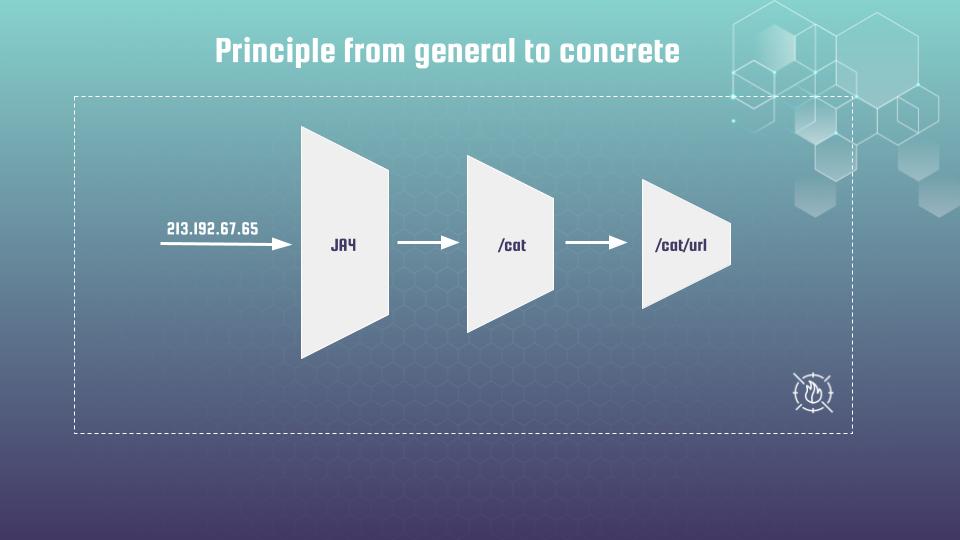
We use a funnel principle:
- General (JA4): Detect the burst of traffic sharing a technical profile.
- Concrete (Scope Down): Narrow that detection to requests that also look like bots (e.g., via User-Agent).
The WAF Rule
Here is a practical Terraform example of a rate-based rule keyed by JA4. Notice the scope_down_statement. This ensures we only count requests against the limit if the User-Agent contains “bot”.
resource "aws_wafv2_web_acl" "main" {
  name        = "production-waf-ja4-rate-limit"
  description = "WAF protection using JA4 fingerprinting"
  scope       = "CLOUDFRONT" # Must be CLOUDFRONT for edge WAF
  provider    = aws.us_east_1 # CloudFront WAFs must be in us-east-1

  default_action {
    allow {}
  }

  visibility_config {
    cloudwatch_metrics_enabled = true
    metric_name                = "ProductionWAF"
    sampled_requests_enabled   = true
  }

  # ----------------------------------------------------------------
  # Rule: Rate Limit by JA4 Fingerprint
  # ----------------------------------------------------------------
  rule {
    name     = "rate-limit-by-ja4"
    priority = 5

    action {
      # We use count first to test, then switch to block or captcha
      count {}
    }

    statement {
      rate_based_statement {
        limit              = 200 # Threshold: 200 requests per 5 minutes
        aggregate_key_type = "CUSTOM_KEYS"

        # Optional: 1-minute window for faster reaction (uncomment if needed)
        # evaluation_window_sec = 60

        # The Custom Key Definition: Aggregate by JA4
        custom_key {
          ja4_fingerprint {
            # Behavior if JA4 cannot be computed (e.g. non-TLS request?)
            fallback_behavior = "NO_MATCH"
          }
        }

        # ----------------------------------------------------------------
        # Scope Down Statement: "The Noise Filter"
        # ----------------------------------------------------------------
        # We only apply this rate limit if the User-Agent contains "bot".
        # This reduces false positives on legitimate browsers (Chrome/Safari)
        # while aggressively targeting declared bots or scripts.
        scope_down_statement {
          byte_match_statement {
            search_string         = "bot"
            positional_constraint = "CONTAINS"

            field_to_match {
              single_header {
                name = "user-agent"
              }
            }

            text_transformation {
              priority = 0
              type     = "LOWERCASE"
            }
          }
        }
      }
    }

    visibility_config {
      cloudwatch_metrics_enabled = true
      metric_name                = "rate-limit-by-ja4"
      sampled_requests_enabled   = true
    }
  }
}
The “Boring” Job: Statistical Tuning with Athena
The most critical mistake engineers make is guessing the limit. Is 200 requests right? Or 2000?
If you guess, you will either block nothing or block your CEO. You must measure real traffic. I use Amazon Athena to query WAF logs and calculate the p95 (95th percentile) of traffic bursts per fingerprint.
Here is the query I use to find “WAF-like” traffic spikes:
WITH per_ja4_bin AS (
  SELECT
      ja4fingerprint     AS ja4,
      from_unixtime(300 * floor("timestamp"/1000/300)) AS time_bin,
      COUNT(*)           AS req_count
  FROM waf_logs
  WHERE ja4fingerprint IS NOT NULL
  AND year = '2025' AND month = '11'
  GROUP BY ja4fingerprint, from_unixtime(300 * floor("timestamp" / 1000 / 300))
),
waf_like AS (
  SELECT
      time_bin,
      SUM(req_count) AS counted_like_waf
  FROM per_ja4_bin
  WHERE req_count > 1
  GROUP BY time_bin
)
SELECT
   approx_percentile(counted_like_waf, 0.95) AS p95
FROM waf_like;
This query tells me how big the traffic bursts are for repeated JA4 fingerprints in the busiest time windows. It removes the guesswork.
Real World Results
Does it work? Let’s look at the data.
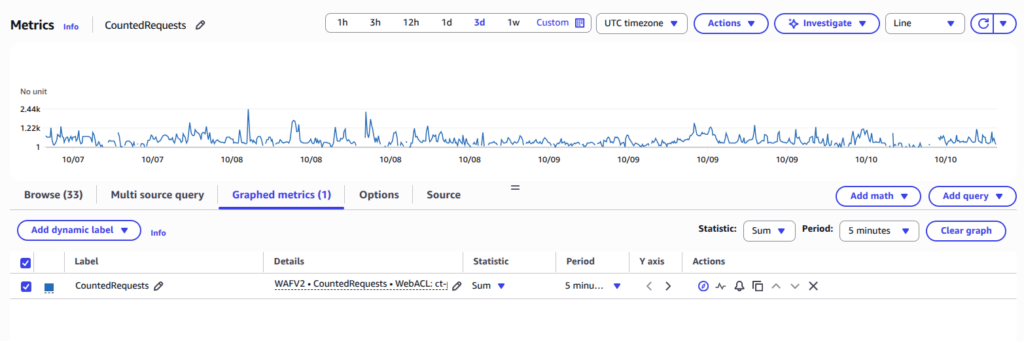
First, here is the traffic on a service without the scope-down statement. It is pure noise. The JA4 hash is too broad, and it’s impossible to set a threshold that separates users from bots.
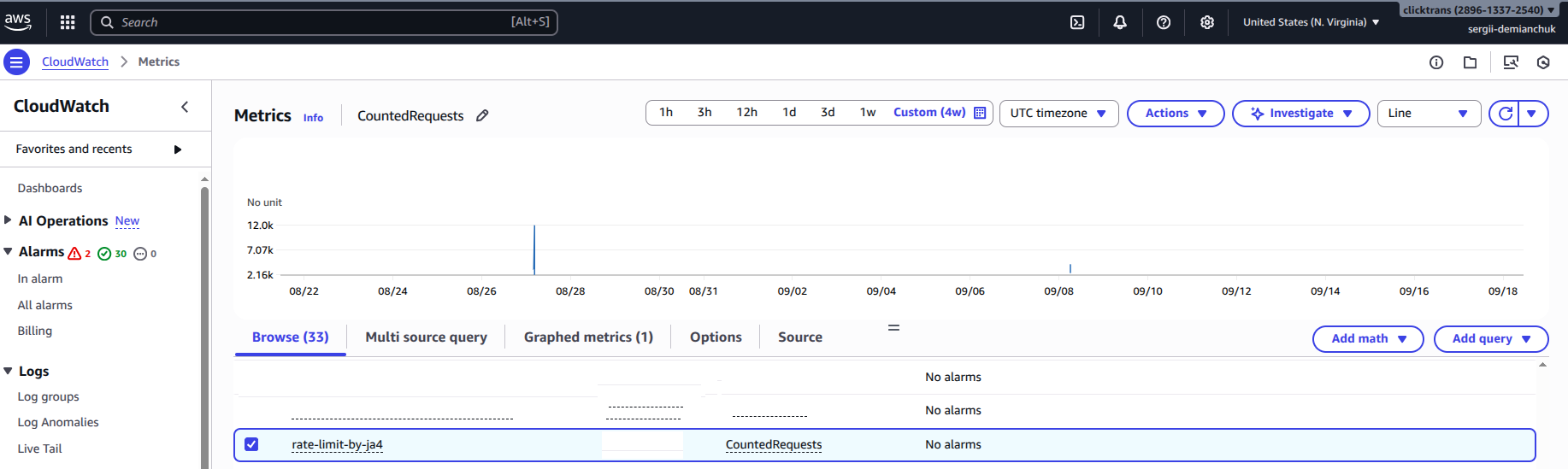
But, when we apply the scope_down_statement (filtering for “bot” User-Agents), the picture changes completely. The noise disappears, and the attack spikes become evident.
Summary
JA4 is not a silver bullet, but it is a powerful tool when combined with other signals. It forces attackers to rotate not just their IPs (which is cheap), but their entire TLS stack (which is expensive).
Implementing this requires patience. You will have to analyze logs and tune thresholds for every specific service. It’s a boring job, but the security payoff is worth it.
If you want to master AI Bots defense workflows, I invite you to join my Udemy course: DevSecOps on AWS: Defend Against LLM Scrapers & Bot Traffic. We dive deep into the hands-on labs that turn defense concepts into a fortress.