
Hi! Today an interesting practical “journey” related to network performance and AWS limitations is shared.
It all started with a growing Symfony application running on a Docker Swarm cluster. The setup used powerful EC2 instances for the application layer and a Managed Valkey (Redis) cluster for caching and sessions. Everything seemed fine until traffic began to scale. Suddenly, strange performance drops and network timeouts were observed that did not correlate with CPU or RAM usage.
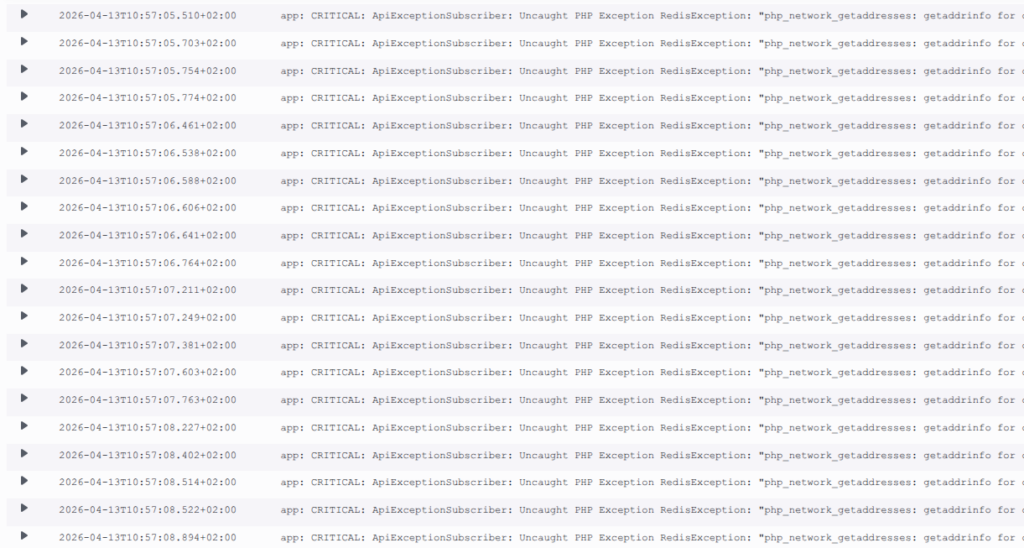
The Investigation: Hidden Packet Throttling
When the network metrics for the app instances were analyzed, high values — around 100MBps — were seen, but the real clue was found deeper in the system. By running ethtool on the network interface, the “smoking gun” was discovered:
root@app-node:~# ethtool -S ens5 | grep exceed
     bw_in_allowance_exceeded: 111092
     pps_allowance_exceeded: 14997
The instances were being throttled at the hardware level. Specifically, the PPS (Packets Per Second) limit was being reached. On AWS, most instances have a hard ceiling of 1024 PPS for DNS queries via the VPC resolver.
When a tcpdump was performed on port 53, the screen flooded with requests:
sudo tcpdump -ni ens5 host <private ec2 IP> and udp port 53It was discovered that every single worker in the cluster was firing multiple DNS lookups (A and AAAA records) for Redis on every single request.
The Attempted Fix: Why Local DNS Caching Failed
Initially, a logical fix was proposed: install a local DNS server (like dnsmasq) on the EC2 host to cache these requests. However, in a Docker Swarm environment, it was found to be more complex than expected.
Inside a container, 127.0.0.1 refers to the container itself, not the EC2 host. Several potential workarounds were investigated:
- Binding containers to the host network: This was rejected due to security concerns and the loss of network isolation between services.
- Forcing Docker Swarm to use the host DNS: While theoretically possible, this was looked upon as potentially unstable and difficult to maintain across a dynamic cluster.
It was observed that Docker’s embedded DNS (127.0.0.11) acts as an extra hop, forwarding queries to the upstream VPC DNS. Because the workload was containerized, the host-level DNS cache was effectively bypassed, and the “Packet Tax” on the network interface remained.
The Resolution: Application-Side Persistent Connections
It was realized that the problem had to be solved at the application level. By enabling Redis persistent connections (pconnect), the network pattern was fundamentally changed. Instead of a “DNS + Handshake” sequence for every request, the sockets are kept open by the PHP workers.
However, a new risk was introduced: Failover. If a new Master is promoted by ElastiCache, existing long-lived sockets might stay “stuck” to the old IP. To solve this, a strategy was needed to force periodic re-resolution without flooding the DNS.
The Strategy: Finding the “Sweet Spot” for pm.max_requests
To find the right recycling rate for the workers, AWS Athena was used to analyze the ALB logs. The Requests Per Second (RPS) for the API was calculated:
SELECT
  date_trunc(
     'minute',
     date_parse(time, '%Y-%m-%dT%H:%i:%s.%fZ')
  ) AS minute,
  count(*) / 60.0 AS rps
FROM alb_logs
GROUP BY 1 ORDER BY 1;
With a known average RPS and a specific number of active workers, the lifetime of a worker was estimated. A value of pm.max_requests = 600 was chosen.
Why 600?
- Low DNS Traffic: Persistent connections are reused for hundreds of requests.
- Failover Recovery: Under normal load, workers are recycled every few minutes. This ensures that if an IP change occurs, the new Master IP is recognized by the app within a short, acceptable window.
The Technical Validation: Is 700+ Connections Safe?
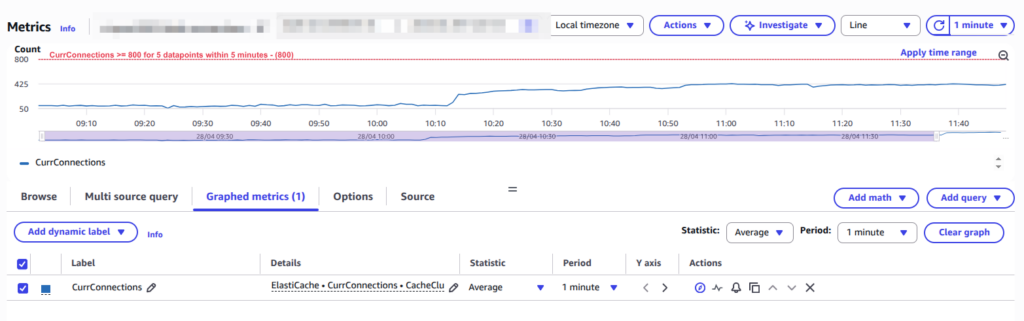
After the change, the connection count on the Redis side jumped from a few dozen to several hundred. While this might appear concerning on a monitoring dashboard, the technical safety is proven by the math:
- The Multiplier: (Number of Nodes) × (Workers per Node) × (Redis Clients per Worker).
- The Load: For a cluster of this size, approximately 500-700 connections were resulted.
- The Capacity: Our Redis nodes support 65,000 connections. Less than 1.5% of capacity is being utilized.
The memory overhead for these connections is roughly 10MB — a tiny price to pay for the elimination of thousands of packets per second of DNS noise.
Summary of the Journey
- Look beyond CPU/RAM: It was learned that Network “Allowance” limits (PPS) can throttle a powerful instance even if it is mostly idle.
- Infrastructure Complexity vs. Stability: Caching DNS within Docker Swarm looked complicated and potentially unstable; application-level fixes were found to be more robust.
- Application-Level Filtering: It was concluded that persistent connections combined with a calculated worker restart (
pm.max_requests) provide the best balance between performance and failover reliability.
By moving the fix to the application layer, the throttling was not only stopped, but the application was actually made faster by removing handshake latency.
Hopefully, this journey was found to be interesting! If high-traffic PHP is being run on AWS, ethtool stats should be checked—the results might be surprising.
